

If you’ve heard about IPTV but feel confused about what it is and how it
works, you’re not alone. With millions of people ditching cable for IPTV,
understanding the technology has become essential.
In this beginner-friendly guide, I’ll explain exactly how IPTV works in
simple terms — no technical jargon, just clear explanations you can
understand.
By the end, you’ll know everything needed to decide if IPTV is right for you.
Table of Contents
What is IPTV in Simple Terms?
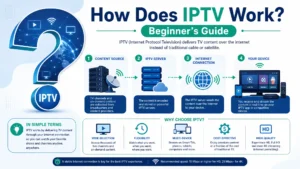
IPTV stands for Internet Protocol Television.
In simple words: IPTV delivers TV channels through your internet
connection instead of cable wires or satellite dishes.
Think of it like this:
- Cable TV: Uses physical cable to bring TV to your house
- Satellite TV: Uses a dish to receive TV signals from space
- IPTV: Uses your internet to stream TV channels
How IPTV Actually Works (Step-by-Step)
Let me break down the process:
Step 1: TV Channels Are Sent to Servers
IPTV providers receive TV signals from:
- Broadcast networks
- Satellite providers
- Cable companies
- Streaming services
These signals are converted into digital format and uploaded to powerful
servers around the world.
Step 2: You Subscribe to an IPTV Service
When you subscribe to IPTV, you get:
- A username and password
- A server URL (or M3U URL)
- Access to thousands of channels
Step 3: You Install an IPTV App
The IPTV app is your remote control. Popular apps include:
- IPTV Smarters Pro
- TiviMate
- OTT Navigator
- Smart IPTV
See our best IPTV players review for
recommendations.
Step 4: Your Device Connects to Servers
When you open an IPTV app:
- You enter your credentials
- App connects to provider’s servers
- Server sends channel list to your device
- You see all available channels
Step 5: You Click a Channel
When you click a channel:
- App requests that stream from server
- Server starts sending video data
- Your device receives data packets
- Video plays on your screen instantly
All this happens in 1-2 seconds!
The Technology Behind IPTV
Here’s the technical magic (simplified):
Streaming Protocols
IPTV uses these protocols to deliver video:
- HLS (HTTP Live Streaming) – most common
- RTMP (Real-Time Messaging Protocol)
- MPEG-TS (MPEG Transport Stream)
Video Encoding
Videos are compressed using:
- H.264 (older standard)
- H.265/HEVC (newer, more efficient)
- AV1 (newest, best compression)
Quality Levels
IPTV supports multiple qualities:
- SD (480p)
- HD (720p)
- Full HD (1080p)
- 4K UHD (2160p)
What You Need for IPTV
To use IPTV, you need:
1. Internet Connection
- HD streaming: 10+ Mbps
- 4K streaming: 25+ Mbps
- Multiple devices: 50+ Mbps
2. Compatible Device
IPTV works on:
- Smart TVs (Samsung, LG, Sony)
- Streaming devices (Firestick, Roku, Apple TV)
- Phones and tablets (iOS, Android)
- Computers (Windows, Mac)
- Smart boxes (Android TV, MAG)
3. IPTV App
Free apps to choose from. See our best IPTV players.
4. IPTV Subscription
Quality services like Digital Lizard IPTV offer affordable plans
starting at $9.99/month.
Types of IPTV Services
There are 3 main types:
1. Live TV Streaming
Real-time broadcast of:
- News channels
- Sports events
- TV shows as they air
- Local channels
2. Video On Demand (VOD)
Watch anytime:
- Movies (100,000+)
- TV series
- Documentaries
- Special content
3. Time-Shifted TV
Catch up on programs:
- Recorded shows (7-day catch-up)
- Pause live TV
- Rewind broadcasts
IPTV vs Traditional TV
Here’s the comparison:
| Feature | Cable/Satellite | IPTV |
|---|---|---|
| Delivery | Physical cables/dish | Internet |
| Channels | 200-300 | 20,000+ |
| Cost | $100-200+/mo | $10-15/mo |
| Quality | HD limited | 4K available |
| Devices | Set-top box | Any device |
| Contracts | 1-2 years | None |
| Installation | Required | Self-setup |
| Location | Home only | Anywhere |
For detailed cost analysis, see our IPTV vs Cable TV comparison.
Benefits of IPTV
Why millions are switching to IPTV:
1. Affordability
Save $1,000+ per year compared to cable.
2. More Channels
100x more channels than traditional TV.
3. Flexibility
Watch anywhere with internet.
4. Better Quality
4K streaming available on most channels.
5. No Contracts
Month-to-month flexibility.
6. Massive Library
150,000+ movies on demand.
7. International Content
3,000+ international channels.
8. Multi-Device
Watch on multiple devices simultaneously.
Common IPTV Concerns
Let me address common questions:
Is IPTV Legal?
Yes, IPTV technology is legal. However, providers must have proper
licensing for the content they distribute.
Legal IPTV Services:
- Have proper licenses
- Provide refund guarantees
- Have customer support
- Use legitimate business practices
Illegal IPTV Services:
- Stream without licenses
- Offer “lifetime” subscriptions
- Have no contact information
- Require anonymous payment only
Is IPTV Safe?
Quality IPTV services are safe when you:
- Choose reputable providers
- Use a VPN for privacy (see our best VPN for IPTV guide)
- Avoid pirated content
- Pay through secure methods
Do I Need Special Hardware?
No, IPTV works on existing devices:
- Your current TV (if smart)
- Your phone/tablet
- Your computer
- A simple Firestick ($30)
What About Internet Data?
IPTV uses internet data:
- HD: 3-5 GB per hour
- 4K: 7-15 GB per hour
Most home internet plans have unlimited data.
Setting Up IPTV: Easier Than You Think
Despite sounding complicated, setup is simple:
Quick Setup Process:
- Subscribe to IPTV service (5 min)
- Install app on device (2 min)
- Login with credentials (1 min)
- Start streaming (instant)
Total time: 8-10 minutes!
For specific devices:
Common IPTV Issues
Some issues you might encounter:
Buffering
Cause: Slow internet or ISP throttling
Solution: Use VPN, upgrade internet, or see buffering fixes
App Not Working
Cause: Outdated app or cache issues
Solution: Update app, clear cache, restart device
Channels Not Loading
Cause: Server issues or expired subscription
Solution: Check subscription, contact provider
For detailed troubleshooting, see IPTV not working on Firestick.
How to Choose the Right IPTV Service
Key factors to consider:
1. Channel Selection
Look for:
- 20,000+ channels
- Your favorite networks
- International options
- Sports coverage
2. Quality
Check for:
- 4K/UHD support
- HD streaming
- Anti-buffering tech
- Stable servers
3. Pricing
Reasonable prices:
- $8-15/month
- Discounts for longer plans
- No hidden fees
- Money-back guarantee
4. Customer Support
Essential:
- 24/7 availability
- Live chat support
- Quick response (under 15 min)
- Setup assistance
5. Free Trial
Always test before buying:
- 24-hour minimum trial
- No credit card required
- Full feature access
Frequently Asked Questions
Can IPTV replace cable completely?
Yes! Most cable customers report better experience with IPTV.
How much can I save with IPTV?
Average savings: $2,400 per year vs cable.
Do I need fast internet?
10 Mbps minimum for HD. 25 Mbps for 4K.
Will IPTV work without WiFi?
Yes, with mobile data, but uses lots of data.
Can I record TV shows?
Yes, with premium apps like TiviMate.
What about local channels?
Quality IPTV services include local channels worldwide.
How long do IPTV subscriptions last?
Choose monthly, 3-month, 6-month, or yearly plans.
Is IPTV Right for You?
IPTV is PERFECT if you:
✅ Have reliable internet (10+ Mbps)
✅ Want to save money
✅ Like watching variety of content
✅ Travel frequently
✅ Want 4K quality
✅ Hate contracts
IPTV might NOT be for you if:
❌ Have poor/no internet
❌ Don’t trust streaming
❌ Need extensive tech support
Final Thoughts
IPTV represents the future of TV viewing. With internet getting faster
and devices getting smarter, traditional cable is becoming obsolete.
Whether you’re looking to:
- Save money on TV
- Access more channels
- Watch international content
- Get 4K quality
IPTV delivers on all fronts at a fraction of cable’s cost.
Ready to Try IPTV?
Experience the future of TV with Digital Lizard IPTV:
✅ 22,000+ Live Channels
✅ 150,000+ Movies & TV Shows
✅ 4K/UHD Quality
✅ Works on ALL devices
✅ Anti-Buffering Technology
✅ 24/7 Customer Support
✅ $9.99/month (vs $200+ for cable)
✅ 24-Hour Free Trial
✅ 7-Day Money-Back Guarantee
Welcome to the future of TV!